Setting up a new business
Create your business in two short steps: your details, then your opening hours.
After you sign in for the first time, a short wizard sets up your business. It is two steps, and you can change everything later.
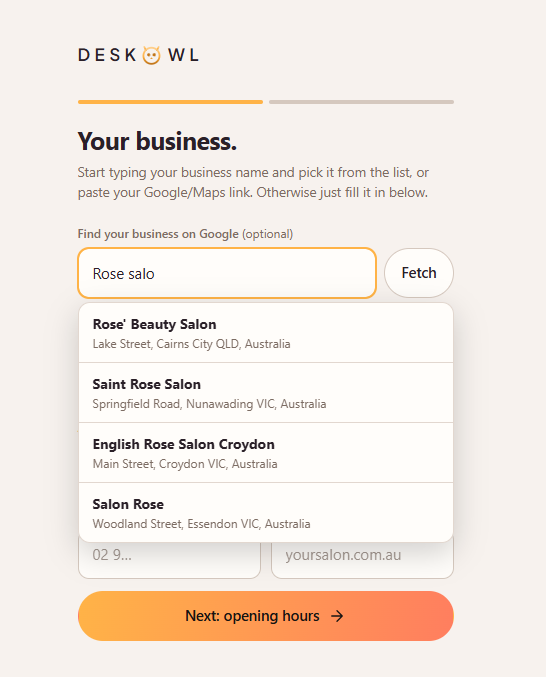
Step 1: Your business
Enter your business name, and optionally your address, phone and website. The address helps callers find you and sets your currency. If your business is on Google, start typing its name or paste your Google link and we fill in the details for you, including your hours.
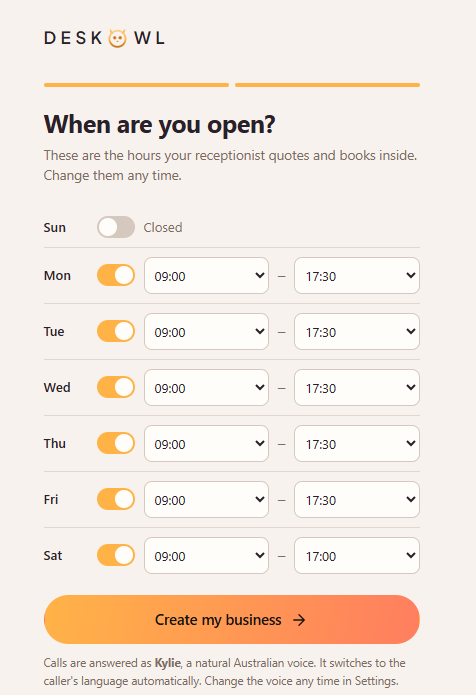
Step 2: When are you open?
Set your opening hours for each day. These are the hours your receptionist quotes to callers and books appointments inside. A day can be closed, or have its own hours. Then choose Create my business.
That is it. Your receptionist starts with a natural Australian voice, which you can change any time. You land on your Dashboard, where a checklist walks you through the rest: your services, your team, and choosing a plan when you are ready to go live.
Good to know. Nothing here is permanent. Every detail can be changed later from Settings.
Still need help?
Raise a support request from the Help and support screen inside the app. It reaches us with your business already attached, so we can help straight away.